
The Everyday Checklist Everyone Need: How to Recycle Electronics Safely
A clear, real-world guide on how to recycle electronics safely. Covers data removal, battery handling, drop-off centers, donation, and packing tips for stress-free e-waste disposal.

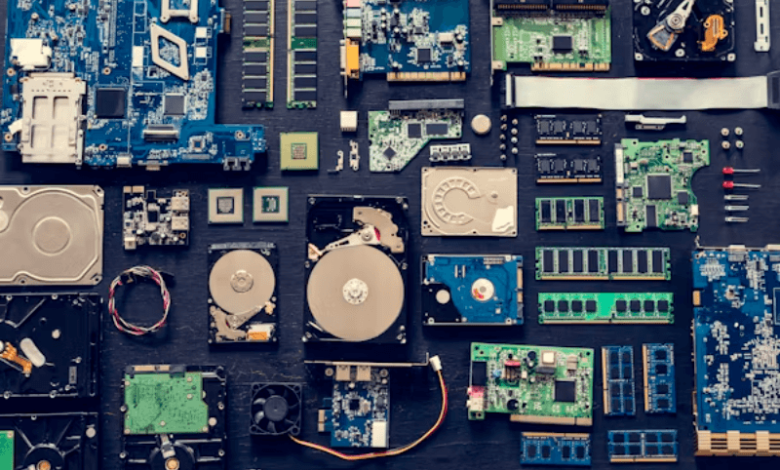
A cracked phone screen sits in a drawer. A buzzing charger in the wall gives a faint warm smell. How to Recycle Electronics Safely becomes a daily question for households and offices. Safe e-waste handling prevents fires, guards data, and keeps metals in circulation. Simple steps, done right. That’s how it should feel.
Why is Recycling Electronics Essential?
Discarded devices leak heat, noise, and sometimes fumes in cramped storerooms. Informal dumping spreads sharp bits of glass and plastic into local lanes. Formal e-waste routes recover copper, gold, aluminium, and rare parts, so new mining eases. Fewer landfills, fewer backyard burn piles, quieter nights for neighbours. Sounds basic, still many skip it. That’s how it usually goes.
Types of Electronics That Can Be Recycled
Busy homes stack older gadgets behind shoe boxes. Offices hold rows of tired monitors. A quick map helps.
| Category | Common Items | Typical Recoveries | Notes on Handling |
| Personal devices | Phones, tablets, smartwatches | Copper, gold, lithium, glass | Remove SIM, memory, and cases first |
| Computing | Laptops, CPUs, servers, keyboards | Aluminium, steel, circuit boards | Back up data, then wipe drives |
| Home media | TVs, set-top boxes, speakers | Plastics, copper coils, glass | Older CRT units need careful transport |
| Kitchen & small | Mixers, toasters, hair dryers | Aluminium, motors, cords | Clean and bag loose parts |
| Networking | Routers, modems, switches | Boards, ports, wiring | Reset, then label for asset logs |
| Power & storage | UPS units, hard drives | Lead, batteries, magnets | Keep upright, avoid heat and sparks |
The table looks simple, but it saves calls later. Small habits matter.
Back Up and Erase Your Personal Data
A quiet room, a cable, a labelled folder. Backups first. Photos, PDFs, invoices, device settings. Then permanent wipe using built-in reset or disk erase tools. Multiple passes for old hard drives. Remove memory cards, clear linked accounts, and log out of cloud sync. No half steps. Data leaks feel small at first, then turn into headaches. Everyone has seen one case too many.
Remove Batteries and Hazardous Parts Safely
Warm chargers and swollen batteries give away a sour, metallic smell. That is a sign to stop. Detach batteries using basic hand tools, avoid bending or piercing. Tape terminals to prevent sparks. Keep cells in a dry, cool box, not a car trunk in summer. For printers, pull out toner and ink units, seal in pouches. For CRTs or gas lamps inside appliances, certified teams only. No bravado. Safety first, then paperwork.
Find and Use Certified E-Waste Recycling Centers
Certified centers issue receipts, follow strict tracking, and keep material inside proper channels. Collection drives at housing societies help residents move piles in one afternoon. Many centers offer pick-up for bulk lots, with asset tags and serial capture. Clear sorting speeds up processing. Mixed cartons slow lines and cause arguments at the gate. A neat list on the box fixes that, simple.
Consider Donating or Refurbishing Working Devices
A laptop with a cracked hinge still boots. A TV remote with missing back cover still clicks clean. Donation groups accept working sets after basic checks. Refurbishers replace storage, add fresh batteries, and keep the device in service for another cycle. Students, community labs, small shops, they all appreciate steady machines. Not every box must enter the shredder. Practical choice, less noise, more use.
Common Mistakes to Avoid When Disposing Electronics
Rushing leads to mess. Typical errors keep repeating:
- Dumping devices with kitchen waste, causing cuts for waste workers.
- Leaving batteries inside, leading to swelling and bin fires.
- Selling parts online without data erase, then getting calls later.
- Shipping cracked screens without padding, glass everywhere on arrival.
- Mixing cables with food containers, sticky residue on copper.
These look minor on paper. On the ground, they burn time and trust.
Benefits of Recycling Electronics Properly
Clean storerooms, safer housing blocks, fewer late-night alarms. Metals return to factories, so prices stay steady. Offices get compliance logs that auditors actually accept. Children at home breathe easier without smoke from backyard fires. The change is visible within a month. Maybe quicker.
FAQs
1. How can households ensure hard drives are wiped before handover to a recycler?
Built-in reset plus a full disk erase works for most drives, while older units may need secure multi-pass software and a wipe report.
2. What signs suggest a lithium battery is unsafe to transport for recycling?
Bulging sides, chemical smell, sudden warmth, or visible dents indicate risk, so use a fire-resistant pouch and contact a certified center.
3. Can cracked televisions be recycled if glass flakes during packing at home?
Yes, but the unit needs firm padding, sealed edges with tape, and careful loading to prevent loose shards in the transport vehicle.
4. Do certified e-waste centers provide formal evidence for audit or CSR records?
Most provide receipts, serial logs, and final processing notes, which help compliance teams close files without repeated clarifications later.
5. Is donation better than recycling for still-working laptops with minor faults?
If key parts function, donation or refurbishing keeps machines in service longer, then recycling can follow after the second lifecycle.